
01Connect sessions through the work#
Open the sessions you want to connect in split-view groups. They become available to one another automatically, even across groups that are not on screen. Ask one session to read another’s recent work, send it a message or delegate a task.
For example, ask your writing session to use the research session’s findings for a launch brief. The agent reads that session’s recent visible progress and uses it in its own work. A message sent to a peer appears in the receiving conversation with the sending session identified.
02See the connections in Agent map#
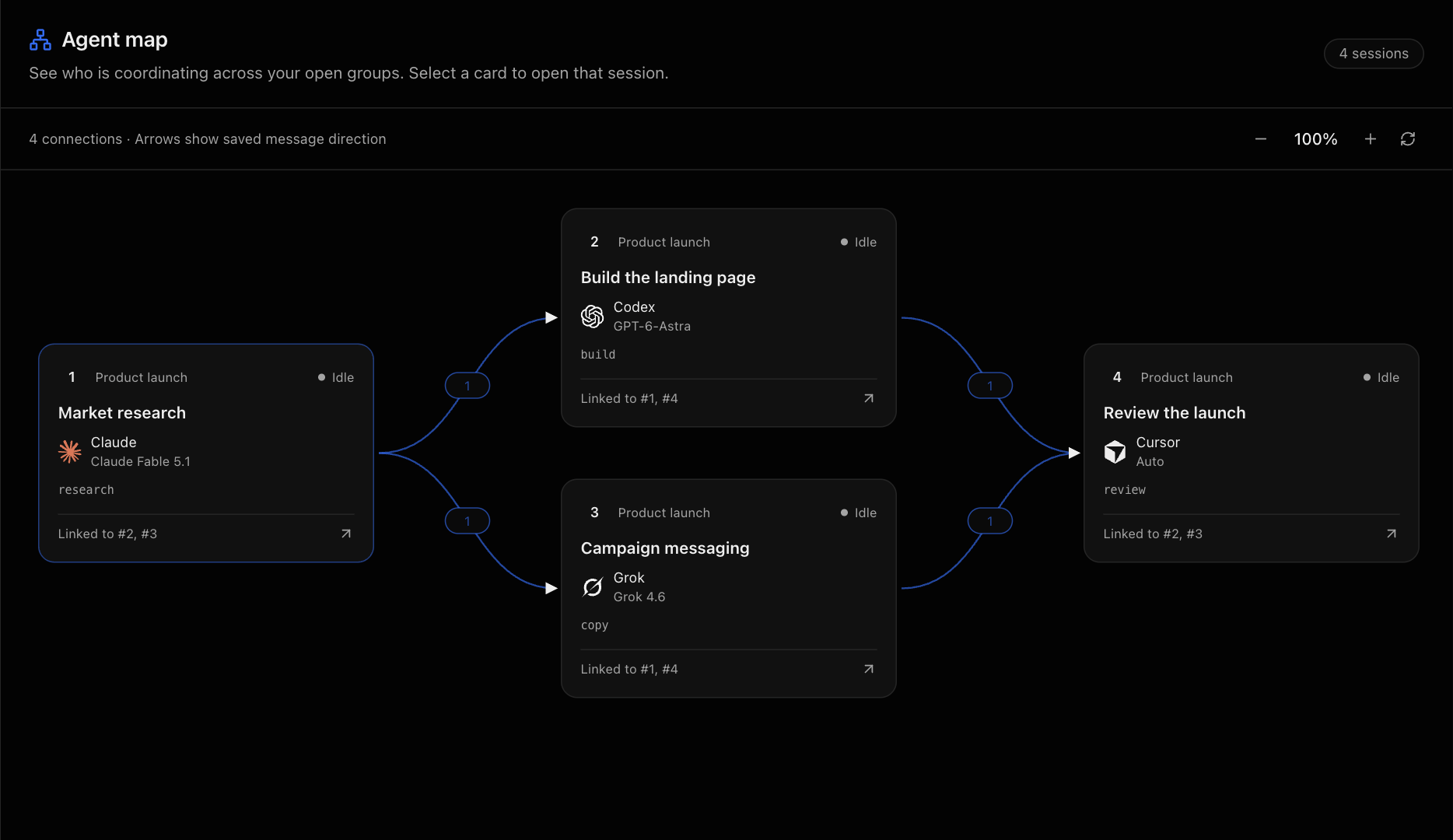
Open Agent map from the group bar. Each card shows a session number, provider, model and current status. Select a card to jump to that session.
Arrows show the direction of messages, and the number on a connection shows how many messages were exchanged. Reading a session alone does not create an arrow. This gives you a view of which agents have coordinated, alongside their current activity.
03Carry context across providers and devices#
The sessions can use different providers. They can also run on different connected hosts when both hosts support session bridging. Keep the web or desktop client open and connected to those hosts.
Shared context is recent visible conversation and activity. It does not merge the chats or synchronize their files. Cross-host messages appear in the receiving conversation; Agent map currently draws message arrows within each host.
Your agents can build on work already done, while each session remains a separate place to continue that part of the job.